article
Tally Waitlist: How to Build One (Free) + When to Switch
How to build a Tally waitlist in minutes — the free form, where responses go, and the three things Tally can't do: referrals, queue positions, and emails.
Tally is one of the best free form builders — which is exactly why so many founders type "Tally waitlist" before they have a product. You can build a waitlist form in Tally in ten minutes. The question is what happens after the first hundred signups.
This guide shows how to build a Tally waitlist, what it does well, and the three things it cannot do — so you know when to move to a dedicated waitlist tool.
The short answer
Yes, you can make a waitlist with Tally. Build a form with an email field, embed it or share the link, and route responses to a spreadsheet. It is free and fast.
What Tally will not do: give each person a referral link, show them their position in the queue, or send automated waitlist emails. Those are the parts that turn a signup form into a waitlist that grows.
How to build a Tally waitlist
- Create the form. In Tally, add an email field. Keep it to one field — every extra field lowers completion.
- Add only the fields you need. A name is usually fine. Resist phone numbers and long questions at the validation stage.
- Write the page. A one-line promise ("Join the waitlist for [product]"), one sentence on what happens next, and the form.
- Embed it or share the link. Tally gives you a hosted form URL and an embed snippet. Use the link if you have no site; embed it if you do.
- Route the responses. Connect Tally to Google Sheets, Airtable, or Notion — or export the CSV.
- Send updates manually. Tally collects the email. Emailing the list is a separate job and a separate tool.
That is a working waitlist. For validation, it is often enough.
What Tally does well
- A genuinely good form editor — fast, pleasant, no code.
- A free tier with unlimited responses — rare, and useful when you are validating.
- Clean embeds — the form looks like it belongs on your page.
- Integrations — Sheets, Airtable, Notion, Zapier, and more.
If all you need is "collect emails and look professional", stop here.
Where a Tally waitlist stops working
The gaps appear the moment you want the list to grow itself:
- No referrals. Every signup is one signup. There is no unique link and no "invite a friend to move up".
- No queue position. People cannot see where they are, so there is no reason to share.
- No waitlist emails. No welcome, no progress update, no launch-day broadcast — unless you add an email platform.
- No waitlist analytics. You can count rows, but you cannot see views, conversion rate, or which channel works.
At that point you are running three tools (Tally + Sheets + an email platform) to do what one waitlist tool does.
Tally vs a dedicated waitlist tool
| Tally (free) | GetWaitly (free → $5/mo) | |
|---|---|---|
| Form | ✅ Excellent | ✅ Embeddable widget + hosted page |
| Referral links | ❌ | ✅ Unique link per subscriber |
| Queue positions | ❌ | ✅ Live position + leaderboard |
| Waitlist emails | ❌ (add an email platform) | ✅ Welcome + broadcasts with tracking |
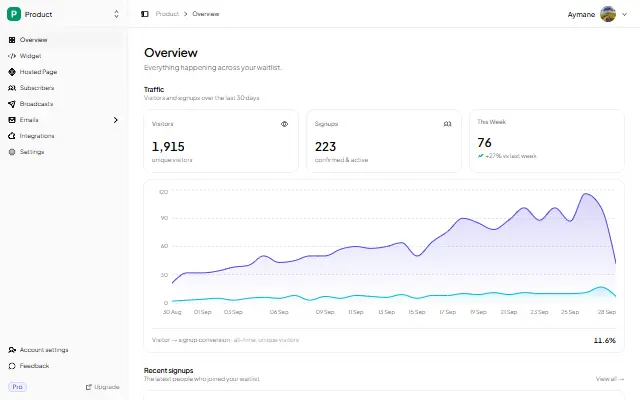
| Waitlist analytics | ❌ | ✅ Views, signups, conversion |
| Price | Free (paid from $29/mo) | Free, then $5/mo |
When to switch
Switch when any of these becomes true:
- You want signups to bring more signups (referrals).
- You are about to email the list and do not want a second tool.
- You need to show progress or urgency ("you're #214").
- You want to know which channel actually converts.
You do not need to rebuild anything: use the same copy, move it to a hosted page or an embed, and turn referrals on.
FAQ
Is Tally free for a waitlist?
Yes. Tally's free plan includes unlimited form responses. Paid plans add features you may not need for a simple waitlist.
Can Tally send emails to my waitlist?
Not as a waitlist sequence. Tally can send form notifications and confirmations, but ongoing updates and launch emails need an email platform — or a waitlist tool that includes them.
Can I add referrals to a Tally form?
Not natively. You would need a separate referral tool and a way to pass the email between them. That is the point at which a dedicated waitlist tool is simpler.
When should I move off Tally?
When you want referrals, queue positions, waitlist emails, or analytics. For pure validation, Tally is fine.
Related guides
- Which Form Builder for a Waitlist? — Tally, Typeform, Google Forms, Carrd, and a dedicated tool compared
- Waitlist Creator: Create a Waitlist Page in Minutes — the dedicated-tool route
- Waitlist Email Templates You Can Copy Today — the emails Tally does not send for you
- How to Add a Waitlist to Any Website — if you already have a site
Start free — collect your first 100 signups with referrals and emails built in. Try GetWaitly →

written by
Aymane E.
Founder of GetWaitly. I write about validating ideas, pre-launch, and growth from building a waitlist tool as a solo founder.
Follow on X