article
Should You Build Your Own Waitlist? (Real Cost vs a Tool)
Building your own waitlist looks cheap with AI and serverless — until you add email deliverability, spam, referrals, and maintenance. An honest build-vs-buy breakdown.

A founder I talked to on X built his app's waitlist himself. AI wrote most of the code, and an AWS backend held the emails. It worked. It also took him a weekend, and he still had to wire up confirmation emails, block duplicate signups, and keep the whole thing from filling up with spam.
That instinct is easy to understand. AI coding tools make "just build it" feel almost free. But a waitlist is not a static form. It is a form, a database, email deliverability, referral tracking, spam control, and analytics. Each piece is small on its own. Together they are a side project.
So before you open Cursor, Lovable, or a blank Cloudflare Worker, here is an honest cost breakdown of building your own waitlist versus using a tool.
The short answer
For a pre-launch waitlist, building your own almost always costs more time than it saves. You can be collecting signups in about five minutes with a dedicated waitlist tool for $0 to $5/mo. Build your own only if you are doing it to learn, you have unusual requirements the tools cannot meet, or the waitlist itself is core to your product.
The four realistic options
1. Build it yourself (AI + serverless)
What it is: You generate the form and backend with an AI assistant, then deploy to Vercel, Cloudflare, or AWS, with a database like Supabase or Postgres.
When it works: You are a developer, you want the learning, or you need behavior no tool offers.
Where it falls short: You own every edge case — deliverability, bots, dedupe, unsubscribe, referral abuse — and you maintain it forever. The code is the easy part.
Best for: Developers who want a project, not founders who want signups.
2. A no-code form plus a spreadsheet
What it is: Tally, Typeform, or Google Forms collecting into Airtable or Sheets.
When it works: You want something live today and you do not care about referrals or branded emails.
Where it falls short: No queue position, no referral loop, no broadcast emails, and the "page" is a bare form with none of your brand on it.
Best for: A first test of whether anyone cares.
3. A landing-page builder's form
What it is: Carrd, Framer, or Webflow with a native form.
When it works: You already have a landing page there.
Where it falls short: These tools store submissions but do not run a waitlist — no referrals, no position, no built-in email broadcasts.
Best for: Founders who already have a page and want the form in place.
4. A dedicated waitlist tool
What it is: A tool built for exactly this — a form, a hosted page, referrals, emails, and analytics.
When it works: You want to launch fast and grow the list.
Where it falls short: You are constrained to what the tool offers. That is usually the point.
Best for: Almost every pre-launch founder.
Comparison
| Approach | Time to live | Cost | You still build or run | Best for |
|---|---|---|---|---|
| Build it yourself | 20–40+ hrs | $0–$20/mo + your time | Auth, DB, email deliverability, spam, referrals, analytics, uptime | Developers, unusual needs |
| No-code form + sheet | 30 min | $0 | Referrals, emails, branding | A quick first test |
| Landing-page form | 1 hr | $0–$19/mo | Referrals, queue, broadcasts | You already have the page |
| Dedicated waitlist tool | 5 min | $0–$5/mo | Nothing | Pre-launch founders |
What "building a waitlist" actually includes
The form is the visible 10%. The rest is what makes it survive contact with real users:
- Email validation and double opt-in so your list is real and not full of typos.
- A database with dedupe so the same email cannot join twice.
- Transactional email — the confirmation — plus deliverability: SPF, DKIM, bounces, and staying out of spam.
- Spam and bot protection so a launch-day spike does not fill your list with junk.
- Referral links, queue position, and fraud checks if you want the list to grow itself.
- Broadcast emails to the whole list when you launch, with unsubscribe handled.
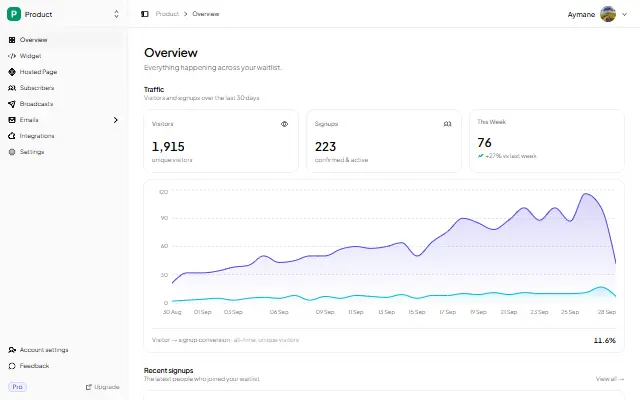
- Analytics so you know views, signups, and conversion rate.
- Hosting, TLS, and uptime on the day you actually share the link.
Each one is a known problem. None is hard on its own. All of them together are why a "weekend project" quietly becomes three weeks.
What a weekend actually gets you
Here is the honest split. In a focused weekend with AI help, you can realistically ship:
- A form that posts to an API route.
- Rows in a database.
- A confirmation email.
- A thank-you message.
What you will not have by Sunday night, unless you are very experienced:
- Deliverability that survives real volume.
- Referral tracking that resists abuse.
- Broadcast emails with unsubscribe and open tracking.
- Analytics you can act on.
Those are the parts that make a waitlist useful after launch, and they are exactly the parts a dedicated tool already solved.
The hidden costs
- Deliverability. A DIY sender with no domain setup lands in spam. Fixing that is real work, not a config flag.
- Referral abuse. The moment referrals move people up a queue, someone games it.
- Unsubscribe and privacy. Marketing email needs a working unsubscribe path — and, if you have EU subscribers, more than that.
- Maintenance. Every dependency, every provider limit, and every bug is yours to own at 2am.
When building your own is the right call
- You are a developer and the learning is the point.
- You need behavior no waitlist tool supports.
- The waitlist is core product IP, not a marketing page.
- You already own the stack — auth, database, email — so the marginal cost is truly near zero.
Otherwise the tool wins on time, and time is the one thing a pre-launch founder cannot buy back.
If a waitlist is the right approach, you do not need to build the plumbing
GetWaitly is a waitlist tool for founders launching a product. Embed a branded signup form on any site with one script tag, or publish a hosted page if you do not have a site yet. Referral links, queue positions, broadcast emails, and analytics are included. Free to start, from $5/mo.
It does not do everything — it is deliberately not a page builder or a referral suite. But it covers the pre-launch essentials so you can skip the backend entirely. For the honest boundary, see Who GetWaitly Is Not For.
FAQ
Is it cheaper to build my own waitlist?
Only if your time is free. The cash cost is low ($0–$20/mo), but a working waitlist is 20–40+ hours to do well, plus ongoing maintenance. A tool is $0–$5/mo and live in minutes.
Can AI build my waitlist?
AI can write the form and backend quickly. It cannot handle email deliverability, spam, referral abuse, or the ongoing ops — which is where most of the real effort lives.
What is the minimum viable waitlist?
Three things: a form, somewhere to store the emails, and a confirmation email. That is enough to validate demand — but not enough to grow a list with referrals or to email it at launch.
Should I build or buy for a pre-launch?
Buy. Building makes sense for learning or genuinely unusual needs, not for a standard pre-launch waitlist.
Related reading
- How Much Does a Waitlist Tool Cost? (Real Prices)
- Which Form Builder for a Waitlist?
- How to Create a Waitlist Page (Free, No Code)
- How to Validate a SaaS Idea Without Building Anything
If you would rather skip the backend, you can be collecting signups in five minutes. Start your waitlist free →

written by
Aymane E.
Founder of GetWaitly. I write about validating ideas, pre-launch, and growth from building a waitlist tool as a solo founder.
Follow on X