article
How to Create a Waitlist Page (Free, No Code)
How to create a waitlist page in about five minutes with no code and no website: publish a hosted page or embed a form — plus what the page needs to convert.

You have an idea and no product yet. You want a page where people can raise their hand and join a list, so you can prove demand and have an audience ready on launch day. You do not want to code it, and you do not want to pay a developer for a one-page form.
The good news: a waitlist page is one of the few things you can genuinely ship in five minutes without touching code. Here is how, plus what the page actually needs to convert.
The short answer
The fastest way to create a waitlist page is a hosted waitlist page — you publish it, get a link, and share it. No code, no website required. If you already have a site, you can embed a signup form on it instead. Both are free to start.
Four ways to create a waitlist page
1. A hosted waitlist page (no website needed)
What it is: A tool publishes a finished signup page for you at a URL, like getwaitly.com/w/your-id.
When it works: You do not have a site yet, or you want something live today.
Where it falls short: The page lives on the tool's domain unless you add a custom domain (usually a paid plan).
Best for: Founders validating an idea before they have any web presence.
2. Embed a form on a site you already have
What it is: Paste a signup form into your existing page — Carrd, Framer, Webflow, WordPress, Notion, or plain HTML.
When it works: You already have a landing page and want the form on your own domain.
Where it falls short: You need a page to embed into, and some builders require a paid plan for custom code.
Best for: Founders with an existing site.
3. A no-code form builder plus a page
What it is: Tally, Typeform, or Google Forms, linked from a simple page.
When it works: You want the absolute simplest possible form.
Where it falls short: No queue position, no referral loop, no branded confirmation emails, and no waitlist-specific analytics.
Best for: A quick first test of demand.
4. Build it yourself
What it is: A form plus your own backend and database.
When it works: You are a developer and want the learning, or you have unusual needs.
Where it falls short: You own deliverability, spam, referrals, and maintenance. See the full breakdown in Should You Build Your Own Waitlist?.
Best for: Developers, not founders who just want signups.
How to create a waitlist page with GetWaitly (free, ~5 minutes)
- Create a free account. No credit card. The free plan covers one waitlist and up to 100 subscribers.
- Create your waitlist and set the headline, description, accent color, and font. This is your page's content and branding — the structure is handled for you.
- Publish the hosted page. You get a shareable URL like
getwaitly.com/w/your-id. (Or copy the embed snippet and paste it into a site you already have.) - Share the link. Put it in your bio, a tweet, a Reddit comment, or a cold email. Signups land in your dashboard with analytics.
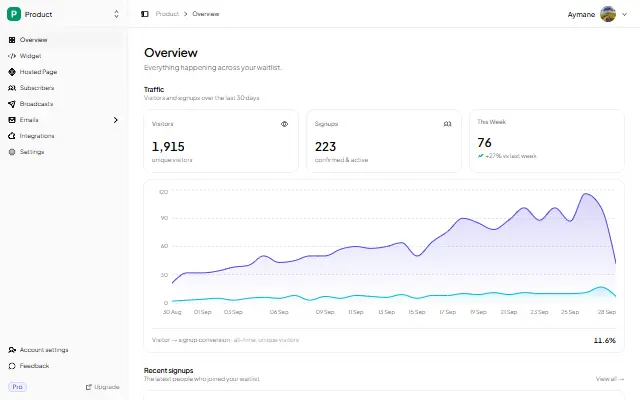
That is the whole setup. The form handles validation, dedupe, and spam protection for you.
What a waitlist page actually needs to convert
The page can be short. It only has to answer three questions: what is this, is it for me, and what happens if I join?
- A one-line promise. Not a feature list — the outcome. "Get early access to X" beats "X is a platform for Y."
- One field. Email only. Every extra field costs conversions; name and phone can wait.
- What happens next. "We'll email you once, at launch" removes the fear of spam.
- A reason to join now. Early access, a founding-member price, or a queue position.
- Referrals (optional). If you turn them on, each subscriber gets a link and moves up the list when friends join — the list grows itself.
More on the copy itself: Waitlist Copywriting That Converts.
Comparison
| Approach | Time to live | Cost | Hosted page? | Referrals? | Best for |
|---|---|---|---|---|---|
| Hosted waitlist page | 5 min | $0–$5/mo | Yes | Yes (paid) | No site yet |
| Embed on existing site | 15 min | $0–$5/mo | Optional | Yes (paid) | You have a page |
| Form builder + page | 30 min | $0 | No | No | A quick test |
| Build it yourself | 20–40+ hrs | $0–$20/mo | You build it | You build it | Developers |
FAQ
Can I create a waitlist page for free?
Yes. GetWaitly's free plan includes a hosted page, an embeddable widget, analytics, and up to 100 subscribers, with no credit card. Referrals and email broadcasts start on the Starter plan at $5/mo.
Do I need a website to have a waitlist page?
No. That is the point of a hosted page — GetWaitly publishes one for you at getwaitly.com/w/your-id. You only need a site if you would rather embed the form on your own domain.
What should my waitlist page say?
One clear promise, one email field, and a line about what happens next. Keep it under a screen of text. The full checklist is in Waitlist Copywriting.
Should I use a form builder or a waitlist tool?
A form builder collects an email. A waitlist tool collects an email and gives you a queue position, referral links, and broadcast emails — the parts that turn a list into an audience. Compare them in Which Form Builder for a Waitlist?.
Can I add a waitlist to a site I already have?
Yes. Copy the embed snippet and paste it into Carrd, Framer, Webflow, WordPress, or any HTML page. The step-by-step for every platform starts at How to Add a Waitlist to Any Website.
Related reading
- Waitlist Creator: How to Create a Waitlist Page in Minutes
- Waitlist Copywriting That Converts
- Should You Build Your Own Waitlist?
- How Long Does It Take to Grow a Waitlist?
Ready to launch? Your waitlist page can be live in about five minutes — free, no code, no credit card. Create your waitlist →

written by
Aymane E.
Founder of GetWaitly. I write about validating ideas, pre-launch, and growth from building a waitlist tool as a solo founder.
Follow on X