article
How to Add a Waitlist to Kajabi (Custom Code)
Add a GetWaitly waitlist to a Kajabi page with a Custom Code block — no coding — and launch your next course to a list instead of an empty room.

Kajabi is where a lot of creators and course sellers build their home on the internet — pages, email, and products in one place. If you are launching something new, a waitlist is the fastest way to gauge interest before you build the offer.
Kajabi pages support custom code blocks, so you can embed the GetWaitly widget directly. If your theme or plan gives it trouble, the hosted page is a clean fallback.
The short answer
Add a Custom Code block to your Kajabi page, paste the two-line GetWaitly snippet, and publish. The waitlist collects signups in about five minutes, and referrals and broadcast emails are built in.
What you need
- A GetWaitly account with a waitlist created (the free plan covers 100 subscribers).
- A Kajabi page you can edit and publish.
Step 1 — Copy the embed snippet
In your GetWaitly dashboard, create a waitlist and set its headline, accent color, and font. Open Settings → Widget and copy the snippet:
<script src="https://getwaitly.com/widget.js" defer></script>
<div class="gw-widget" data-waitlist-id="YOUR_WAITLIST_ID"></div>
The widget inherits your waitlist's branding, so it matches your Kajabi page.
Step 2 — Add it to Kajabi
- Open the page in the Kajabi page editor.
- Add a Custom Code block where the form should appear.
- Paste both lines from Step 1.
- Save and publish the page.
Step 3 — Test it
Open the live page and submit a test email. Confirm the subscriber appears in your GetWaitly dashboard.
If the form does not show, check that both lines were pasted and the block has enough width.
The fallback: use the hosted page
If custom code is not available on your plan, publish GetWaitly's hosted page — a complete signup page served by GetWaitly.
- Publish the hosted page at
getwaitly.com/w/your-id. - Link a Kajabi button to that URL, or embed it in an iframe.
Why a waitlist before a course
- You validate demand before you build the curriculum.
- You launch to a list instead of an empty room.
- Referrals grow the list while you record.
- Broadcast emails warm the list up before the doors open.
More: Pre-Launch Marketing for Solo Founders.
What you get
- A styled signup form matching your accent color and font
- Optional name, phone, and custom questions
- Referral links and queue positions (Starter plan and above)
- Broadcast emails with open and click tracking (Starter and above)
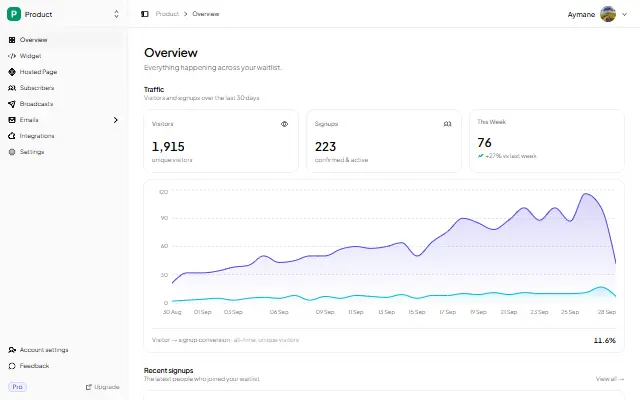
- Analytics: views, signups, conversion rate, 30-day trend
FAQ
Can I add a waitlist to a Kajabi page without coding?
Yes. You paste a snippet into a Custom Code block — no programming. If custom code is unavailable, link to the hosted page.
Why is my Kajabi embed blank?
Usually the <div> or the <script> was missed, or the block has no height. Re-paste both lines and widen the block. If it still fails, use the hosted-page iframe.
Can I email the waitlist from GetWaitly, or should I use Kajabi's email?
Both work. GetWaitly includes broadcast emails from the Starter plan, which is enough for pre-launch updates. Export the list as CSV if you would rather send the launch sequence from Kajabi.
Is it free?
Yes. The free plan includes the widget, a hosted page, analytics, and up to 100 subscribers. Referrals and broadcasts start at $5/mo.
Related reading
- Waitlist Email Sequence: 5 Emails That Convert
- Add a Waitlist to Your Website: Every Platform Guide
- How to Create a Waitlist Page (Free, No Code)
Build the list before you build the offer — free, no code. Start your waitlist →

written by
Aymane E.
Founder of GetWaitly. I write about validating ideas, pre-launch, and growth from building a waitlist tool as a solo founder.
Follow on X