article
How to Add a Waitlist to an AI-Built App (Lovable, Replit, Bolt, v0)
Add a waitlist to a Lovable, Replit, Bolt, or v0 app in about five minutes — ask the builder's AI to embed the widget, or link a hosted page. No backend needed.

AI app builders changed who can ship software. Lovable, Replit, Bolt, and v0 let a founder describe an app and get working code back in minutes — no CS degree required. So when that same founder needs a waitlist, the instinct is to ask the AI to build one too.
Here is the thing: you usually should not. A waitlist looks like a form, but it is really a database, confirmation emails, deliverability, spam control, and analytics. Those are the parts AI is weakest at, and the parts a dedicated tool already solved. The good news is that adding a waitlist to an AI-built app takes about five minutes — either by asking the builder to embed a widget, or by linking a hosted page.
The short answer
Add a GetWaitly waitlist to a Lovable, Replit, Bolt, or v0 app in one of two ways:
- Ask the builder's AI to add the widget — paste one script tag and a container div, or describe it in a prompt.
- Publish a hosted page and link to it — no code at all.
Both are free to start. The widget keeps the form on your domain; the hosted page is faster if you have not wired up routing yet.
Why this works here (and not on Notion or Bubble)
Notion and Bubble sandbox custom JavaScript, so the GetWaitly widget script cannot run inside them — those platforms have to use the hosted page in an iframe. AI app builders are different: they generate real HTML and React, so the widget script runs normally. That makes these apps one of the easiest places to add an embedded waitlist.
Method 1 — Ask the builder's AI to add the widget
Every one of these tools has an AI you can talk to. Paste a prompt like this and let it wire everything up:
Add a waitlist signup form to my landing page using GetWaitly. Add this script to the page head:
<script src="https://getwaitly.com/widget.js" defer></script>, and place<div class="gw-widget" data-waitlist-id="YOUR_WAITLIST_ID"></div>where the form should appear. Style it to match the page.
Replace YOUR_WAITLIST_ID with the public ID from your GetWaitly dashboard (Settings → Widget). The widget inherits your waitlist's accent color and font, so it matches the page automatically.
This is the fastest path if you are already in the builder's chat, and it is the most on-brand result.
Method 2 — Add the script manually
If you prefer to edit the files yourself, the change is two lines.
Vite / React projects (Lovable, Bolt.new): add the script to index.html inside <head>, and the container div where the form goes.
Next.js projects (v0): load the script with next/script in your layout or page, and render the container div in your component.
import Script from "next/script";

export function WaitlistForm() {
  return (
    <>
      <Script src="https://getwaitly.com/widget.js" strategy="afterInteractive" />
      <div className="gw-widget" data-waitlist-id="YOUR_WAITLIST_ID" />
    </>
  );
}
The full embed reference, including popup and DIY-form variants, is in the embed widget docs.
Method 3 — Publish a hosted page and link it
If your app does not have a landing route yet, or you want zero code, publish GetWaitly's hosted page instead. You get a shareable URL like getwaitly.com/w/your-id with your headline, branding, and form already styled. Point a button or a nav link at it.
This is the right call when you are still moving fast and the app's structure is changing daily — no embed to break when the AI rewrites your components.
Per-tool notes
Lovable
Lovable generates React (Vite) apps. The widget works in the index.html head, or ask Lovable's AI to add it. If you have not built the landing route yet, link the hosted page first and embed later.
Replit
Replit hosts many stacks. For a plain HTML/JS project, add the script to your HTML. For a React or Node project, use the same two-line embed, or link the hosted page. The Replit webview renders the widget normally.
Bolt.new
Bolt.new generates Vite/React apps in the browser. Add the script to index.html, or ask Bolt to add it. Because the preview reloads often, the hosted page link is a safe fallback while you iterate.
v0
v0 generates Next.js (React) components. Use next/script with the container div as shown above — scoping the script to the component avoids hydration mismatches. v0's AI can add this for you.
What you get
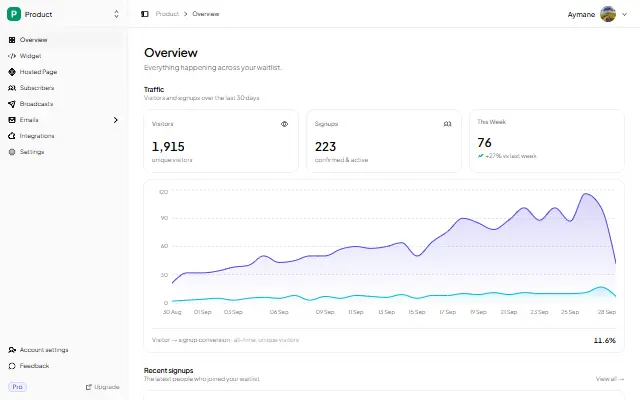
Once the widget or hosted page is live, GetWaitly handles the rest: validation, dedupe, spam protection, optional name and phone fields, referral links and queue positions (Starter and above), broadcast emails with open and click tracking, and an analytics dashboard. Signups land in one place regardless of which builder you used.
FAQ
Can I add a waitlist to a Lovable app without coding?
Yes. Ask Lovable's AI to add the two-line embed, or publish a hosted page and link it. Either takes a few minutes.
Does the GetWaitly widget work in Replit and Bolt?
Yes. Both produce real HTML or React, so the widget script runs. Notion and Bubble are the platforms that block it and need the hosted page instead.
Should I embed the widget or link a hosted page?
Embed if you want the form on your own domain and your landing page is stable. Link the hosted page if you are still iterating fast or have no landing route yet.
Is it free?
Yes. GetWaitly's free plan includes the embeddable widget, a hosted page, analytics, and up to 100 subscribers, with no credit card. Referrals and broadcasts start at $5/mo.
Related reading
- How to Add a Waitlist to Any Website
- How to Add a Waitlist to Next.js (App Router & React)
- Should You Build Your Own Waitlist?
- How to Create a Waitlist Page (Free, No Code)
Built your app with AI? Add the waitlist the same afternoon — free, no backend. Start your waitlist →

written by
Aymane E.
Founder of GetWaitly. I write about validating ideas, pre-launch, and growth from building a waitlist tool as a solo founder.
Follow on X