article
Carrd vs GetWaitly: Using Carrd as a Waitlist Form Builder
Carrd is a landing page builder, not a waitlist tool. What you miss — referrals, broadcasts, analytics — and how to add a waitlist to Carrd in 5 minutes.

Disclaimer: This comparison is based on publicly available information — vendor pricing pages, documentation, and third-party reviews. Feature availability and pricing may have changed since publication; verify current details on each product's website before making a decision.
Note: Carrd is a landing page builder, not a dedicated waitlist tool. But founders often use Carrd for waitlists by combining it with email platforms and referral tools. This article explains when that approach works, where it falls short, and how a dedicated waitlist tool compares.
You need a landing page to collect emails for your new product. You have heard about Carrd — it is simple, cheap, and everyone uses it. So you build a page in Carrd, connect it to Mailchimp, and call it done.
A month later, you realize you need a referral system so subscribers can share your page. You add Viral Loops. Then you want to send broadcast emails to your list. You upgrade Mailchimp. Then you need to see how many people viewed your page. You add Google Analytics.
You started with one tool. You now have four. And you are paying more than you expected.
Carrd is great at what it does. But what it does is one thing: build a landing page. A pre-launch waitlist needs more than that. So here is the Carrd vs GetWaitly comparison — when Carrd makes sense, when it doesn't, and where GetWaitly fits.
The short answer
If you need just a landing page with email capture routed to an existing platform (Mailchimp, Kit, Resend), Carrd at $19/year is an excellent choice. If you need referrals, email broadcasts, and analytics in one tool — without stitching three separate services together — GetWaitly at $5/mo is the simpler Carrd alternative — it replaces the full stack.
If your real question is "what is the fastest way to build a waitlist form and which form builder fits best," the answer depends on scope. Carrd is a fast form builder if all you need is email capture. The moment you want a referral queue, broadcast emails, or waitlist analytics, a dedicated waitlist tool is the better form builder — because those features are built in rather than bolted on.
Carrd
Carrd (carrd.com) is a one-page site builder. It started as a simple tool for personal profiles and link-in-bio pages. It has grown to support custom domains, forms, and integrations with dozens of email platforms.
What it does well: Carrd is fast, affordable, and easy to use. The free tier lets you build three sites. Pro plans start at $19/year — hard to beat for a simple landing page. Templates are well designed and mobile responsive out of the box. Form integrations work with Mailchimp, Kit, Resend, and many other email platforms.
Where it falls short: Carrd is a landing page builder, not a waitlist tool. There is no Carrd referral system — no unique links, no queue. It has no built-in email broadcasts — form submissions are sent to an external email platform, which you need to set up and pay for separately. It has no waitlist analytics. You build the page in Carrd, manage subscribers in Mailchimp, track referrals through a separate tool, and check analytics in Google. Every feature beyond the landing page is an additional tool, integration, and monthly subscription.
Best for: Founders who already have an email platform and only need a landing page to capture signups. Not ideal if you need referrals, email broadcasts, or subscriber analytics.
Starting price: Free (3 sites), Pro from $19/year
GetWaitly
GetWaitly is a waitlist tool built for founders and makers. It combines the signup form, referral system, email broadcasts, and analytics in one tool.
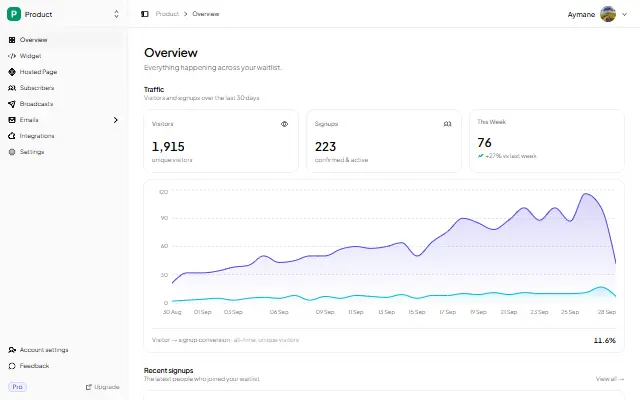
What it does well: Everything a pre-launch waitlist needs in one place. Embed a branded signup form on your Carrd site (inline or popup), or publish a hosted page at getwaitly.com/w/your-id. Every subscriber gets a unique referral link automatically. Broadcast emails include open and click tracking. The analytics dashboard shows views, signups, conversion rate, and trends. Setup takes minutes, not an afternoon of integrations.
Where it falls short: It is not a general-purpose page builder. GetWaitly includes a hosted page and an embeddable widget, but you customize content and branding within one template — not layout, sections, or unlimited designs. If you need a portfolio, a link-in-bio, or a highly custom page without waitlist features, Carrd is the better tool.
Best for: Founders and makers who want one tool for their entire pre-launch workflow. The Starter plan at $5/mo is built for this audience.
Starting price: Free (1 waitlist, 100 subscribers), Starter at $5/mo
Comparison table
| Need | Carrd + extras | GetWaitly |
|---|---|---|
| Landing page | ✅ Built in | ✅ Hosted page + embed |
| Email capture | ✅ Via Mailchimp/Kit/Resend integration | ✅ Built in |
| Referral system | ❌ Need separate tool (Viral Loops $49/mo) | ✅ Built in |
| Broadcast emails | ❌ Need Mailchimp ($13/mo+) or ConvertKit | ✅ Built in |
| Email tracking | ❌ Depends on email platform | ✅ Built in |
| Analytics dashboard | ❌ Need Google Analytics or Plausible | ✅ Built in |
| Setup time | 2-3 days integrating | 5 minutes |
| Logins to manage | 3-4 separate accounts | One |
| Monthly cost | ~$64 (Carrd Pro $1.58 + Mailchimp $13 + Viral Loops $49 + GA free) | Free, paid from $5/mo |
The cost difference is not the real story. It is the cognitive overhead. Every separate tool is a login, a dashboard, a billing cycle, and an integration to maintain. For founders working alone, that overhead matters more than the dollar amount.
When to choose Carrd
Carrd is the right choice if you already have an email platform you are happy with and only need a landing page to capture signups. If you are using Kit, Mailchimp, or Resend and do not need referrals or built-in email broadcasts, Carrd's $19/year pricing is hard to beat for a single page.
Carrd is also the right choice if you need a highly custom page design, a portfolio, or a general-purpose one-page site. It is a landing page builder first. If you are not specifically building a waitlist, Carrd is the better tool.
When to choose GetWaitly
GetWaitly is the right choice if you are launching a product and want a waitlist — not just a landing page. You need referrals so subscribers can share your page. You need broadcast emails so you can communicate with your list. You need analytics so you know what is working. GetWaitly handles all of these in one tool.
GetWaitly is also the right choice if you value speed and simplicity over customization. You go from zero to a live waitlist in five minutes. No integrations, no separate logins, no stitching services together.
The Starter plan at $5/mo covers 1,000 subscribers with referrals, broadcasts, and tracking. That replaces a $64/month stack of separate tools.
FAQ
Can I use Carrd for a waitlist?
Yes, Carrd can capture emails through its form integration with Mailchimp, Kit, Resend, and other platforms. But a waitlist needs more than email capture to succeed. You will need separate tools for referral links, email broadcasts, and analytics. Each tool adds setup time, cost, and complexity.
Does GetWaitly run on my own domain?
Yes. GetWaitly runs on your own site — embed the widget on your Carrd page and the signup form appears on your own domain with your own branding. (GetWaitly also includes a hosted page at getwaitly.com/w/your-id if you don't have a site, but the embed keeps everything on your Carrd domain.)
Can I embed GetWaitly on an existing Carrd site?
Yes. GetWaitly provides an embeddable widget that works on Carrd sites. Copy a script tag, paste it into your Carrd page, and the signup form appears. This is useful if you already have a Carrd site and want to add a waitlist without rebuilding.
Can I build a Carrd waitlist form?
Yes, two ways. You can use a Carrd form element and route submissions to an email platform like Mailchimp or Resend — a simple email capture form, nothing more. Or you can run a full waitlist form on Carrd by embedding the GetWaitly widget, which adds the queue, referral link, and success message without any email platform setup.
How do I add a waitlist to my Carrd page?
If you already have a Carrd site, add an Embed element and paste the GetWaitly widget script tag inside it, then republish. The waitlist form appears exactly where you placed the embed, matching your brand colors. A fully built waitlist on Carrd takes about five minutes — see the step-by-step how to embed GetWaitly on Carrd guide.
Is Carrd really cheaper than GetWaitly?
For a single landing page with no extras, yes — Carrd Pro at $19/year is cheaper than GetWaitly Starter at $5/mo ($60/year). But a functional pre-launch waitlist needs email broadcasts, referral tracking, and analytics. Adding those tools to Carrd brings the total to roughly $64/month ($768/year). GetWaitly covers everything for $5/month ($60/year).
Related guides
- How to Embed GetWaitly on Carrd: A Step-by-Step Guide — a walkthrough for adding a fully featured waitlist form to your Carrd page
- Prefinery vs LaunchList vs GetWaitly — how the most established waitlist tool compares
- The Indie Hacker's Complete Pre-Launch Stack: 4 Tools You Actually Need (and 3 You Don't) — how GetWaitly replaces four pre-launch tools with one
- How to Write Waitlist Copy That Converts Visitors into Subscribers — writing the landing page that Carrd or GetWaitly serves
- How to Build a Referral Program That Grows Your Waitlist Before Launch — the referral mechanic that Carrd users add through separate tools
- Email vs Waitlist vs Landing Page: Which Comes First? — choosing the right channel before you decide on your tool
- Best Waitlist Tools for Solo Founders in 2026: A No-Fluff Comparison — Seven dedicated waitlist tools compared side by side. Which one should solo founders actually use?
The simple, affordable waitlist tool for founders and makers. Start free in 5 minutes — no credit card required. Try GetWaitly free →

written by
Aymane E.
Founder of GetWaitly. I write about validating ideas, pre-launch, and growth from building a waitlist tool as a solo founder.
Follow on X