article
Coming Soon Page vs Waitlist Page: What's the Difference?
A coming soon page collects emails. A waitlist page also gives every signup a place in line and a referral link. Which one to build, and when.
You need something online before the product exists. Half the advice you find calls it a coming soon page. The other half calls it a waitlist page. They look almost identical, so it feels like a naming argument.
It is not. The difference is what happens after someone signs up, and that difference decides whether your list stays flat or grows while you build.
The short answer
A coming soon page announces the product and collects an email. A waitlist page does the same thing, then gives each person a place in line and a link they can share. Same page, one extra step after signup.
Build the waitlist page. It costs the same effort and does strictly more — you can always ignore the queue and referral features if you don't want them, but you cannot add them retroactively without asking people to sign up twice.
The three names for the same thing
The vocabulary in this space is genuinely messy, and most of the confusion is people using three terms for one job. Keep them apart like this:
| Term | What it actually is |
|---|---|
| Coming soon page | The page that announces the product and collects signups. The older, broader term. |
| Waitlist landing page | A coming soon page that gives each signup a place in line and a referral link. |
| Pre-launch waitlist | The list of people the page collects, plus everything you do with them before launch — emails, invites, converting them on day one. |
A coming soon page is the surface. A waitlist is the system behind the surface. Most founders in 2026 build all three at once, because a page that only saves an address leaves the most valuable moment — the signup itself — unused.
Coming soon page vs waitlist page, side by side
| Coming soon page | Waitlist page | |
|---|---|---|
| Job | Announce the product, capture an email | Announce the product, capture an email, start a queue |
| Call to action | "Notify me" / "Coming soon" | "Join the waitlist" / "Get early access" |
| What happens after signup | A thank-you message | A position, a referral link, and a share button |
| Growth mechanics | None — growth stops when you stop promoting | Referrals, queue position, milestone rewards |
| Data you get | An email address | An email address, a source, a referral graph, a conversion rate |
| Setup time | An afternoon on any site builder | About five minutes with a hosted waitlist tool |
| Cost | A page builder subscription, or free | Free tier is normal; paid from a few dollars |
| Best for | A landing spot that just needs to exist | Anything where you want the list to grow itself |
The last row is where people get it wrong. A coming soon page is a placeholder. A waitlist page is a distribution channel. Both are one screen.
When a plain coming soon page is enough
Being honest: there are times the simpler thing wins.
- You have no audience yet and no traffic. A referral loop with nobody to refer to does nothing. Get the page up, get the first fifty signups, then turn on referrals.
- You need a placeholder this afternoon. A one-screen page with a headline and an email field takes an hour. That is a legitimate first step.
- You are rebranding or moving domains. You are not building a list; you are holding a door open. A coming soon page is exactly right.
- The launch is a hard, dated event and you only need reminders. If nobody needs early access and there is no queue to be in, the referral loop has nothing to sell.
In all four cases, start with the simple page. Just build it on something that can grow into a waitlist without a rebuild.
When you need a waitlist page
Four signals that the plain page will cost you:
1. You want referrals. This is the big one. A waitlist page turns every signup into a potential recruiter with a unique link and a reason to share. A coming soon page has no mechanism for this at all — the friend has nothing to join into.
2. Position means something to your buyer. Limited beta slots, early-access waves, a launch discount for the first hundred — anything where being earlier is worth something. Position is the cheapest reward you can offer and it costs you nothing until launch.
3. You are launching into more than one channel. When traffic arrives from a Product Hunt post, a subreddit, a newsletter, and a friend's DM at the same time, you need to know which one worked. Waitlist pages attribute signups; a bare email field does not.
4. You will email the list before launch. A waitlist is a list with a purpose and an end date. If you plan to send updates and protect the relationship, you need the structure: confirmation, position, broadcast history.
What both pages need to convert
The mechanics differ; the fundamentals do not. Five things decide the signup rate either way:
- A headline that names the outcome, not the feature. If a visitor cannot say what the product does after reading one line, nothing below it matters.
- One call to action. No navigation, no second button, no "learn more." Every extra option lowers the primary conversion.
- A one-field form. Email alone is enough to start. Each extra field costs you signups — ask only what changes who you invite first.
- Something that makes the wait concrete. A launch window, a spot count, or a live signup number once it is big enough to help rather than hurt.
- A next step after signup. The moment after someone joins is when they are most interested. A bare "thanks" wastes it.
For context on what good looks like: Unbounce's benchmark report — roughly 57 million conversions across more than 41,000 landing pages — puts the median landing page conversion rate at about 6.6%. Waitlister's analysis of thousands of waitlists reports a median waitlist conversion rate around 11%. A focused waitlist page tends to beat a generic landing page, but treat both as directional rather than targets to beat. Our waitlist benchmarks break down the ranges by traffic temperature.
Mistakes that cost signups
- A vague headline. "Something exciting is coming" is a page that converts nobody.
- A live counter that works against you. "7 people have joined" reads as nobody wants this. Show a count only once it helps.
- No post-signup follow-through. No confirmation email, no link to share, no reason to come back.
- A slow page on a phone. Most pre-launch traffic arrives from social apps on mobile. If the page takes three seconds to load, you have already lost the share of visitors who mattered.
- Building the page a week before launch. The list is the asset, and lists take weeks to build. A page published late is a page that collects nothing.
How to build either one
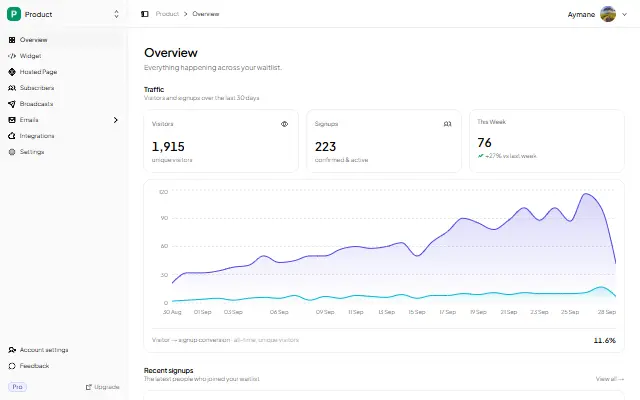
The fastest path for a founder with no website is a hosted page: a public URL, a signup form, and a status page for each subscriber, live in minutes. GetWaitly's hosted page includes the queue, referral links, and broadcast email out of the box, so you can start with a coming soon page and turn on the waitlist mechanics later without moving anything.
If you already have a site, embed the form instead — add a waitlist to any website, or follow the guide for your builder: Carrd, Webflow, WordPress, Squarespace.
Whichever you choose, write the copy before you pick the colours. The copy is what converts — the design is what makes it feel credible.
FAQ
Is a coming soon page the same as a waitlist page?
They share the same goal — collecting interest before launch — and people use the terms interchangeably. The practical difference is what happens after signup: a basic coming soon page saves the address, while a waitlist page also gives each person a place in line and a referral link they can share.
What should a coming soon page include?
A headline that says who the product is for and what it does, one supporting line, a single email field, and one clear button. After signup, show what happens next. Everything else — features, screenshots, a countdown — is optional and should earn its place.
Do I need a website to build a coming soon page?
No. A hosted page gives you a public URL, a signup form, and a confirmation flow without a site of your own. You only need your own site if the page must live on your domain, in which case you embed the form instead.
Is a coming soon page bad for SEO?
No, and it can help: it lets Google index your domain and start ranking for branded searches before launch. Just do not expect an unindexed placeholder to rank for anything else — a one-screen page rarely has enough content to compete.
How long should a coming soon page stay live?
Long enough to build a list worth launching to. Most founders open the page somewhere between two and six months before launch: earlier and signups go cold, later and you lose the window to validate demand.
Can I add waitlist features to a page I already published?
Usually yes, if the page is built on a waitlist tool — queue position and referral links are settings, not a redesign. If your page is a static form feeding a spreadsheet, you will be rebuilding it, which is the reason to pick a tool with the mechanics already wired in.
Ready to publish a page that does both jobs? Start free in 5 minutes →. No credit card required.
Related guides
- Waitlist Page Examples & Templates — real pages worth copying, plus a free template
- Waitlist Copywriting That Converts — the five elements that decide the signup rate
- Waitlist Creator: Create a Waitlist Page in Minutes — the build walkthrough
- Email vs Waitlist vs Landing Page — which to set up first
- Waitlist Glossary — the sixteen terms worth knowing
- Waitlist Benchmarks — the numbers to aim at
- How to Add a Waitlist to Any Website — every platform guide in one place

written by
Aymane E.
Founder of GetWaitly. I write about validating ideas, pre-launch, and growth from building a waitlist tool as a solo founder.
Follow on X