article
The Indie Hacker Tech Stack for 2026
The build and launch stack indie hackers actually need in 2026: Next.js, Supabase, Stripe — plus the four launch tools you can replace with one.
The indie hacker advantage is speed. You can validate, build, and launch before a team finishes its first planning meeting. The stack is what protects that advantage — or quietly destroys it.
Most "indie hacker tech stack" guides cover the build half and stop there. They will tell you to use Next.js and Supabase, then leave you to figure out the part that actually gets people to show up. This guide covers both halves, because a stack that ships a product nobody hears about is not a working stack.
The short answer
The smallest indie hacker stack that ships in 2026 is four tools: Next.js + TypeScript to build, Supabase for database and auth, Stripe for payments, and one launch tool that covers the signup form, broadcast email, referrals, and waitlist analytics. Hosting is free on Vercel or Cloudflare. Total cost before revenue: $0 to about $25/month.
Everything else — a dedicated email platform, a CRM, Zapier chains, a product analytics suite — is an upgrade you add when a specific pain gets loud enough. Not before.
The stack at a glance
| Job | Pick | Cost | Alternative |
|---|---|---|---|
| Framework | Next.js + TypeScript | Free | SvelteKit, Remix |
| Database + auth | Supabase | Free tier | Neon, Clerk + Postgres |
| Payments | Stripe | 2.9% + 30¢ per charge | Lemon Squeezy |
| Hosting | Vercel or Cloudflare | Free tier | Railway, Fly.io |
| Landing page | Your own site, Carrd, or Framer | $0–19/year | Webflow |
| Signup form | GetWaitly widget | Free | Tally + a spreadsheet |
| Broadcast email | Built into the waitlist tool | Free | Mailchimp, Resend |
| Referrals | Built into the waitlist tool | Free | Viral Loops |
| Waitlist analytics | Built into the waitlist tool | Free | Google Analytics |
The last four rows are one tool. That is the whole argument of this page.
The minimum stack: four tools
If you strip away everything you do not strictly need, four tools carry a product from empty repo to first hundred subscribers:
| Job | Tool | Why it makes the cut |
|---|---|---|
| Build | Next.js + TypeScript | Server rendering, routing, and deployment in one framework |
| Store | Supabase | Postgres, auth, and file storage on one free tier |
| Charge | Stripe | The only payment integration you will not regret |
| Launch | GetWaitly | Signup form, email, referrals, and analytics in one place |
Notice what is missing: no email platform, no form builder, no referral app, no analytics suite. Those four jobs are real, but they do not each deserve a separate subscription at this stage.
Part 1 — The build stack
Short verdicts, not tutorials. Every one of these has years of documented edge cases, which is exactly what a solo founder needs: you should be debugging your product, not your framework.
Next.js for the framework
Verdict: use Next.js unless you already know something else well.
Server components cut the amount of client JavaScript you ship, the App Router handles routing and layouts without a second library, and the ecosystem is large enough that any problem you hit has already been answered. TypeScript is not optional — you are the only reviewer on this codebase.
Alternative: if you already write Svelte or Vue, use SvelteKit or Nuxt. Switching frameworks to chase a trend costs weeks you will not get back.
Supabase for database and auth
Verdict: Postgres plus auth on one free tier, and no ORM required to start.
You get a real relational database (not a proprietary store you will migrate off later), row-level security, and authentication without hand-rolling password resets. Add Prisma or Drizzle only if you outgrow the generated TypeScript types.
Alternative: Neon for Postgres alone, or Clerk if you want a more polished auth UI and are willing to pay for it.
Stripe for payments
Verdict: no serious alternative for a solo founder.
Stripe Checkout gets you accepting money in an afternoon, handles subscriptions and tax IDs, and does not require you to think about PCI compliance. Lemon Squeezy is the better call if you sell digital products globally and want a merchant of record to absorb VAT.
Vercel or Cloudflare for hosting
Verdict: both free tiers are generous enough for pre-launch. Pick by where you already are.
Vercel is the zero-config path for Next.js. Cloudflare Workers is cheaper at scale and pairs well with D1 if you would rather keep your database next to your compute. This site runs on Next.js and Cloudflare, and the combination has needed almost no maintenance.
Part 2 — The launch stack
This is the half that most stack guides skip, and it is the half that decides whether you get users. Four jobs, and one tool can do all four.
Signup capture
Your signup form is your storefront. It is where traffic lands and where a visitor decides whether your product is worth an email address.
What you need: a form that loads fast, works on mobile, and lets you set the headline, description, button text, colors, and fonts. Minutes to set up, not hours.
What people overcomplicate: building a custom form backend, or splitting the form, the email list, and tracking across three services — two integrations before you have written a single line of copy.
What works: an embeddable widget dropped into the landing page you already have. The tool handles submission, confirmation, and the referral link. See how to write waitlist copy that converts for the words that go in it.
Broadcast email
Your list is worthless if you cannot talk to it. Email is what turns subscribers into launch-day customers.
What you need: send a broadcast to your whole list, see opens and clicks, and follow up with a segment. You do not need automation flows or drip sequences yet.
What people overcomplicate: signing up for Mailchimp or ConvertKit, configuring DKIM and SPF, then re-importing waitlist signups by CSV every week. That is a full day of setup before you have sent one email.
What works: broadcast email inside the waitlist tool, where the subscribers already are. Read waitlist emails that actually get opened for the structure.
Referral tracking
Referrals are the only part of pre-launch that compounds. Every subscriber needs a link worth sharing.
What you need: an automatic unique link per subscriber, a count of who referred whom, and a visible reward — queue position, early access, or a launch discount.
What people overcomplicate: a custom referral table, a standalone referral platform, or a spreadsheet that breaks at fifty rows.
What works: referrals built into the signup flow, so moving up the list is automatic. See how to build referral tracking into your waitlist and how to design the reward.
Analytics
You need to know how many people signed up, where they came from, and whether growth is accelerating.
What you need: signup count, conversion rate, source attribution, and a trend line.
What people overcomplicate: installing Google Analytics, defining custom events, building dashboards, then wiring referral data in from somewhere else — hours of setup for numbers you will glance at for thirty seconds a day.
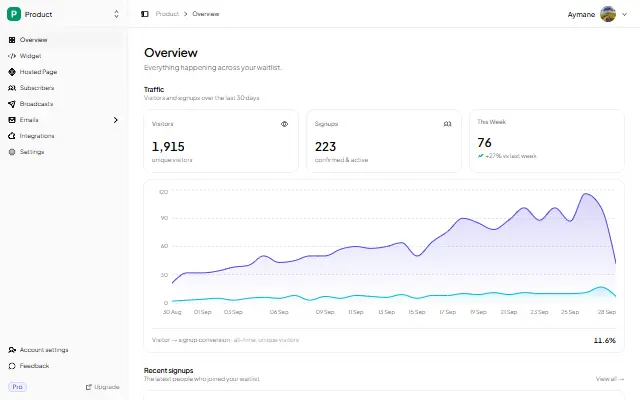
What works: the same dashboard that holds your subscribers. Views, signups, conversion rate, and referral performance together. Compare yours against realistic waitlist benchmarks before you panic about the number.
What you can skip
Indie hackers overcomplicate their stack more than any other group. Four things you genuinely do not need before launch.
A separate email platform
Mailchimp, ConvertKit, and Resend are good products. You do not need one under roughly a thousand subscribers. A waitlist tool with broadcast email handles list management, sending, and open tracking. Add the dedicated platform when you need real automation or advanced segmentation — not before.
A CRM or spreadsheet
Every signup should live in one place. Exporting to CSV or syncing to a CRM before you have a hundred subscribers is overhead with no return. If you need to search, filter, or segment, the waitlist tool should do it.
Zapier or integration chains
Form goes to Google Sheets, which triggers a Mailchimp email, which adds a CRM row, which pings Slack. This is a common setup and it is four points of failure before your first customer. Every integration can break, needs maintenance, and takes an afternoon to configure.
A product analytics suite
PostHog and Mixpanel are the right answer once you have real users clicking real buttons. At pre-launch you have a form and a number. Do not install a funnel tool to watch a funnel that has no traffic in it.
The stack's cost, side by side
| Need | Separate tools | One launch tool |
|---|---|---|
| Signup form | Form builder + backend + database | Built into the waitlist tool |
| Landing page | Carrd ($19/year) or Webflow ($23/mo) | Keep your own site |
| Broadcast email | Mailchimp (free tier, paid from ~$13/mo) | Built in |
| Referral tracking | A standalone referral platform | Built in |
| Analytics | Google Analytics (free, complex setup) | Built in |
| Monthly cost | $30–100+ across three or four tools | Free – $5/mo |
| Setup time | Two to three days of integration | About five minutes |
| Accounts to manage | Three or four | One |
The money matters less than the attention. Every separate tool is a login, a dashboard, a billing cycle, and an integration to keep alive. For one person, that is the real cost.
When to upgrade
This is not your forever stack. It is what you need for validation, audience building, and launch. Graduate when a specific limit starts to hurt:
- 500+ engaged subscribers: a dedicated email platform for automation and segmentation.
- 5,000+ subscribers: PostHog or Plausible for actual product analytics.
- Revenue and a second person: now the tooling conversation is worth having.
Before those thresholds, every additional tool is premature optimization. The cost in money, time, and attention almost always exceeds the benefit.
GetWaitly is the launch half of this stack: an embeddable signup form, broadcast emails, referral tracking, and analytics in one tool. It is free for your first 100 subscribers, and paid plans start at $5/mo, which is less than any single tool it replaces. Start free in five minutes →. No credit card required.
FAQ
What tech stack do most indie hackers use?
Next.js or SvelteKit for the framework, Postgres through Supabase or Neon for data and auth, Stripe for payments, and Vercel or Cloudflare for hosting. On the launch side, most solo founders start with a landing page builder plus a form tool plus an email platform — three subscriptions where one waitlist tool would do.
What tools do you need before launch?
Four jobs: a way to capture signups, a way to email the people who signed up, a way to turn them into referrers, and a way to see whether any of it is working. One waitlist tool covers all four. Build tooling is separate and depends on what you are building.
How much should an indie hacker's stack cost?
Nothing to about $25/month before you have revenue. Framework, database free tiers, and hosting are free. Stripe takes a cut per transaction rather than a subscription. The only line item that usually costs money pre-launch is a landing page builder, and only if you do not already have a site.
Do I need a separate email tool before launch?
No, not under roughly a thousand subscribers. Broadcast email inside your waitlist tool covers list management, sending, and open tracking. You need a dedicated platform when you require automation, advanced segmentation, or team access — needs that appear after launch, not before.
Should indie hackers use no-code instead?
No-code is a legitimate way to validate an idea and a bad way to build a product you intend to keep. If you can write code, build in code from the start: you will avoid a migration you would otherwise pay for later. If you cannot, a landing page plus a waitlist is still enough to test demand.
Is the build half or the launch half more important?
The launch half, if you have to choose. A working product nobody can sign up for generates nothing, while a clear landing page with a waitlist generates validation in a weekend. Build the launch half first.
Related guides
- Best Waitlist Tools for Solo Founders in 2026 — the launch-tool decision, compared side by side
- How to Add a Waitlist to React and Next.js — wiring the launch half into the build half
- The Solo Founder's Pre-Launch Playbook — a 30-day plan that uses this stack
- Launch Day Playbook — what the stack is preparing you for
- Email vs Waitlist vs Landing Page — the channel order that makes the stack work
- Should You Build Your Own Waitlist? — when writing it yourself beats the tool
- Carrd vs GetWaitly — if your landing page builder is Carrd
- Prefinery vs LaunchList vs GetWaitly — if you are comparing the established waitlist tools
- Pricing Your First SaaS Product — pricing the thing this stack helps you validate

written by
Aymane E.
Founder of GetWaitly. I write about validating ideas, pre-launch, and growth from building a waitlist tool as a solo founder.
Follow on X