article
How to Run an Early Access Waitlist for Your Beta
How to run an early-access waitlist for a beta: collect signups, grow the list with referrals, and invite testers in waves — no code, free to start.

You are about to open a beta. You have a working product (or close to it), and you want real users testing it — but not all at once. You need a way to collect interest, then invite people in waves.
That is exactly what an early-access waitlist is for. Here is how to run one, and why it beats throwing a signup link in your bio.
The short answer
An early-access waitlist collects signups before your beta opens, then lets you invite people in controlled waves. You get a demand signal, a queue, and a list you can email — instead of an open door that floods you with users you cannot support.
Why a waitlist instead of an open beta
Opening your beta to everyone sounds generous. In practice it causes three problems:
- No control. You cannot throttle load, support requests, or feedback volume.
- No signal. An open door tells you who showed up, not who wanted in.
- No list. If you collect nothing, you cannot invite more people later or announce your launch.
A waitlist fixes all three. It is a demand signal and a growth loop in one.
How to run an early-access waitlist
- Create the waitlist. One page, one field (email), a clear promise of what early access gets them.
- Publish it. Use a hosted page if you have no site yet, or embed the signup form on the site you already have. No code either way.
- Turn on referrals. Every subscriber gets a unique link, and referrals move them up the queue. This is what makes an early-access list grow itself.
- Confirm intent with double opt-in. Optional, but it keeps your list real and reduces spam signups.
- Invite in waves. Use email broadcasts to invite the first cohort, then the next. Each wave gets a warm welcome and a clear ask.
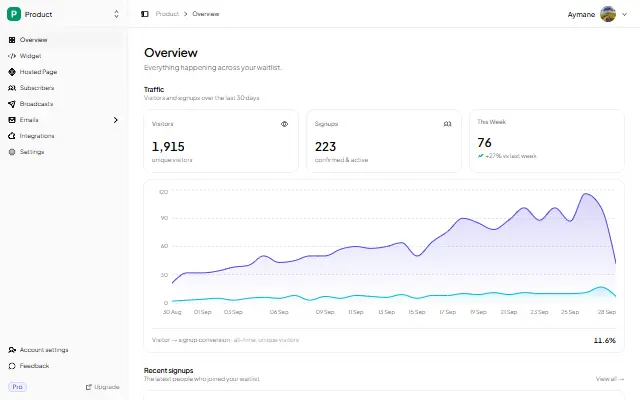
- Watch the numbers. Views, signups, and conversion rate tell you whether your messaging or your traffic is the bottleneck.
Beta vs. early access vs. waitlist
These terms get mixed up:
- Waitlist — collect emails before you have anything to invite people into.
- Early access — a waitlist with a promise: join now, get in before the public.
- Beta — the actual test period. Your waitlist feeds the beta.
In practice they run as one flow: waitlist → early access invites → beta → launch.
What to put on the page
Keep it short. Say what the product does, who it is for, and what "early access" actually gives them (a free month, a founding-member price, a say in the roadmap). Then one button.
The full checklist is in Waitlist Copywriting That Converts.
Why referrals matter more for early access
An early-access list is full of people who want in first. That makes it the ideal place for a referral loop: giving someone a way to move up the queue is a reason to share, and sharing grows the list while you build. We break down the mechanics in the Pre-Launch Referral Program Guide.
FAQ
What is an early access waitlist?
A page where people sign up to get into your product before the public. You collect emails, then invite people in waves. It doubles as a demand signal and a launch list.
How is a waitlist different from a beta signup form?
Functionally similar, but a waitlist usually adds a queue and referrals, and is meant to run before the beta opens. A plain beta form just collects names with no growth loop.
Do I need a website for an early-access waitlist?
No. Publish a hosted page (no site required), or embed the form on a site you already have. Both take minutes and are free to start.
How many people should I invite per wave?
Start with 10–25. Enough to get real feedback, few enough to support them personally. Then scale each wave as your product holds up.
Is it free?
Yes. The free plan includes a hosted page, an embeddable widget, analytics, and up to 100 subscribers. Referrals, double opt-in, and broadcast emails start at $5/mo.
Related reading
- How to Build a Waitlist for a Mobile App Launch — the same flow for an app
- Waitlist Email Sequence: 5 Emails That Convert — what to send your early-access list
- Should You Build Your Own Waitlist? — why not to build the backend yourself
- Waitlist Use Cases: What to Use a Waitlist For — every use case in one place
Run your beta like a launch — collect, queue, invite, repeat. Start your waitlist →

written by
Aymane E.
Founder of GetWaitly. I write about validating ideas, pre-launch, and growth from building a waitlist tool as a solo founder.
Follow on X