article
How to Add a Waitlist to Softr (Widget or Hosted Page)
Add a waitlist to a Softr app: embed the GetWaitly widget on custom-code plans, or embed or link the hosted page when custom code is not available.

Softr is a no-code app builder: you assemble a web app from blocks and connect a data source, no code required. If you are pre-launch, the app is not ready yet — but you still want a waitlist collecting signups today.
There are two ways to put a GetWaitly waitlist in a Softr app. Which one you use depends on whether your Softr plan allows custom code.
The short answer
- If your Softr plan supports custom code: embed the GetWaitly widget so the form renders on your domain.
- If it does not: embed or link GetWaitly's hosted page instead.
Either way you get a working waitlist in about five minutes, and your subscribers live in GetWaitly, ready to import when the app launches.
Option 1 — Embed the widget (custom code plans)
- Create your waitlist in GetWaitly and copy the embed snippet from Settings → Widget:
<script src="https://getwaitly.com/widget.js" defer></script>
<div class="gw-widget" data-waitlist-id="YOUR_WAITLIST_ID"></div>
- Add the script in Softr's app settings under Custom Code (the body/header code area). This loads the widget runtime on every page.
- Place the form on your page using a Custom Code block (or an HTML-capable block) and paste the container
<div>where you want it. - Publish and submit a test email. Confirm the subscriber appears in your GetWaitly dashboard.
The widget inherits your waitlist's accent color and font, so it fits the app without extra styling.
Option 2 — Embed or link the hosted page (any plan)
If custom code is not available on your plan, publish GetWaitly's hosted page — a complete signup page served by GetWaitly, so Softr has nothing to block.
- In your dashboard, publish the hosted page at
getwaitly.com/w/your-id. - In Softr, add an Embed block and point it at that URL, or add a button that links to it.
The link option is the most reliable across plans, and it is clean on mobile.
Which should you use?
| Situation | Use |
|---|---|
| Your plan supports custom code and you want the form on your domain | The widget |
| Your plan blocks custom code | The hosted page |
| You are still building the app and the layout keeps changing | The hosted page (nothing to break) |
What you get
- A styled signup form matching your accent color and font
- Optional name, phone, and custom questions
- Referral links and queue positions (Starter plan and above)
- Broadcast emails with open and click tracking (Starter and above)
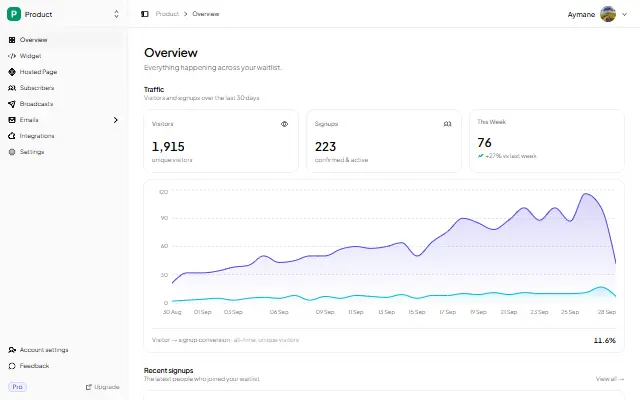
- Analytics: views, signups, conversion rate, 30-day trend
- CSV export, so you can move the list into Softr or Airtable when the app is ready
FAQ
Can I add a waitlist to Softr without code?
Yes. If you use the hosted page, you paste a URL — no code at all. If you embed the widget, you paste one snippet, which is not programming.
Does Softr support the GetWaitly widget?
It depends on your plan. Softr's custom code feature is on paid plans. If it is available, the widget works; if not, use the hosted page.
Where do the signups go?
Into your GetWaitly dashboard, not into Softr. That is deliberate: the list survives any change you make to the app, and you can export it as CSV whenever you are ready.
Is it free?
Yes. The free plan includes the widget, a hosted page, analytics, and up to 100 subscribers. Referrals and broadcasts start at $5/mo.
Related reading
- How to Add a Waitlist to Any Website
- Add a Waitlist to Your Website: Every Platform Guide
- Should You Build Your Own Waitlist?
Collect signups while you build — free, no code. Start your waitlist →

written by
Aymane E.
Founder of GetWaitly. I write about validating ideas, pre-launch, and growth from building a waitlist tool as a solo founder.
Follow on X